An automatic cat feeder can move food into a bowl at a scheduled time, rotate a prepared compartment into reach, or open a lid for a recognized pet. Those are different jobs. Identify what triggers your exact device and what physically moves before choosing its instructions.
A clock, a storage hopper and a microchip reader answer different questions. A timed release does not establish which cat can reach the food, while an identity-controlled lid does not by itself describe a measured serving being dispensed.
Trace the trigger, moving part and food location
Start with the model name and the manufacturer's description. Then trace the food's path: where the owner puts it, which part moves and what causes that movement. The following named examples illustrate three arrangements; they do not cover every feeder design.
| Named device and trigger | What moves | Where the owner loads food |
|---|---|---|
| PetSafe Healthy Pet Simply Feed: a scheduled meal | A conveyor dispenses food from the stored supply toward the bowl. | The hopper stores the supply; the separate bowl receives a release. |
| PetSafe 5 Meal Pet Feeder: a scheduled time | The tray rotates to make its next section accessible. | The owner fills individual tray compartments beforehand. |
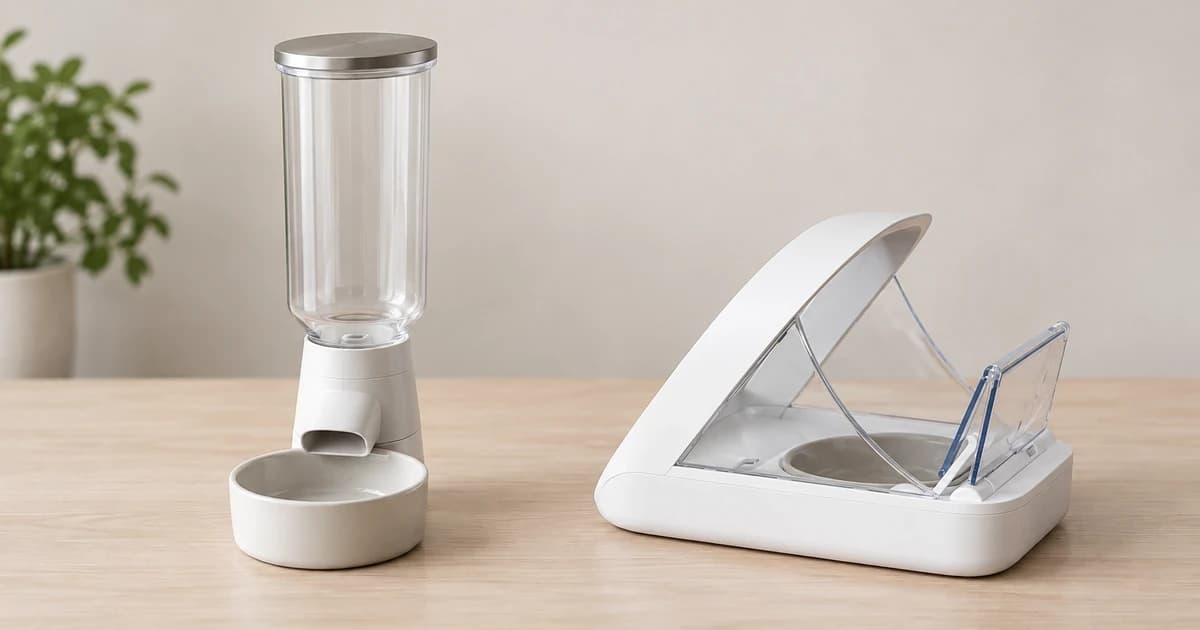
| SureFeed Microchip Pet Feeder: a registered pet approaches | The lid opens to allow access to the bowl. | The bowl holds the prepared food behind the lid. |
This distinction helps interpret a product description. Ask “does it deliver food, expose a prepared meal, or control access?” before asking whether it has an app. Connectivity is another feature to verify for the particular model; it does not identify the feeding mechanism.
A hopper feeder releases food from a stored supply
PetSafe's Healthy Pet Simply Feed PFD00-14574 uses a conveyor system to dispense from its hopper. Its support page specifies a 24-cup storage capacity and separately describes scheduled portions. The storage figure describes how much the container holds, rather than the amount a cat should receive.
In this arrangement, the owner needs the exact instructions for loading the supply and setting the release. A visible bowl outside the housing is the destination; it does not reveal the mechanism inside. Do not assume that another tall dispenser uses a conveyor rather than a different design.
The named page also lists Feed Now, Pause Feed and Slow Feed features. Those labels distinguish extra operating functions, not a universal button sequence. Follow the complete instructions for the actual unit instead of pressing a similar-looking control on another feeder.
A rotating tray exposes food you have already placed
PetSafe's 5 Meal Pet Feeder PFD11-13707 works differently. The owner fills its compartments; one section is accessible initially and the other four can become available at scheduled times. The tray advances to the next section when the scheduled event occurs.
Here, the compartment already contains the intended serving. Tray movement changes access to it rather than drawing a new quantity from a common hopper. That is why a compartment count and a dispensing increment are different specifications.
The named support page permits dry or semi-moist food and lists each section's capacity as one cup. Keep both facts with this model. They do not establish a wet-food preservation time, refrigeration performance or a suitable dietary amount. A different tray design may have different permitted contents and care instructions.
An identity-controlled lid changes access to a bowl
The non-Connect SureFeed Microchip Pet Feeder's product description says it stores a registered pet's identity and opens the lid when that pet approaches. Its described action concerns access to food in the bowl. That is a different mechanism from a conveyor delivering food on a schedule.
A lid opening, an identity being recognized and a quantity being dispensed are separate events. Check which of them your own device actually provides. Do not infer a timed serving, weighing function, app connection or Hub requirement from the word “microchip” or from another model's name.
Compatibility and enrollment still need their own exact instructions. The product page includes a compatibility check and describes gradual lid training, but that overview is not a complete registration procedure. A photograph of a cat at an open bowl cannot establish that recognition worked or that another pet would be excluded.
Read capacity and controls as equipment specifications
| Specification | Question it answers | What it does not establish |
|---|---|---|
| Hopper capacity | How much supply the named container holds. | The amount to feed or a period without human care. |
| Compartment capacity | How much fits in one prepared section. | A dietary serving or preservation time. |
| Scheduled entry | When the named device is set to act. | That food reached the intended cat. |
| Registered identity | Which identity the access system is intended to recognize. | Dispensing accuracy or guaranteed exclusion of other pets. |
Keep a short device record with the exact model, food location, trigger, moving part and matching manual. Separate the maker's description from anything you later observe. “A tray rotated” and “the intended cat ate the prepared food” are different observations.
Compare automatic pet feeders using those questions. A category listing does not verify that a particular model matches these examples or is currently available. For a non-powered bowl whose shapes affect food access, see our slow-feeder bowl guide. Aquarium feeder mounting and programming belong in the separate aquarium feeder setup guide.
This mechanism comparison reports no physical dispensing, identity-recognition or reliability test. Our editorial policy explains source-based guidance.